Turn Training Slides into E-Learning Videos Employees Watch
Static slide decks sit untouched in shared drives. Employees skim bullet points during onboarding. Compliance modules gather digital dust. In today’s distributed, fast-paced work environment, passive consumption of training content no longer delivers results—especially when clarity, retention, and accountability matter most.
Why Narrated Video Outperforms Static Slides for Critical Training

When it comes to onboarding, compliance, safety protocols, or policy rollouts, the difference between a static PowerPoint and a well-crafted narrated video isn’t just aesthetic—it’s behavioral and measurable.
- Higher engagement: Studies consistently show that learners retain up to 65% more information from narrated video versus text-only slides—especially for procedural, contextual, or emotionally resonant topics like harassment prevention or data privacy.
- Better comprehension: Voice narration provides pacing, emphasis, and intonation that guide attention and clarify complex ideas—something bullet points alone cannot do.
- Consistent delivery: Every new hire hears the same explanation, tone, and emphasis—eliminating variability across trainers or regional facilitators.
- Accountability & tracking: When hosted in an LMS, video completion is trackable. Slide views are not.
- Accessibility by design: With subtitles enabled, narrated video supports neurodiverse learners, non-native speakers, and those in sound-sensitive environments—without requiring extra development effort.
This isn’t about replacing live instruction—it’s about strengthening foundational knowledge *before* live sessions. A narrated video sets context, reduces cognitive load in workshops, and ensures baseline understanding across global teams.
Scale Your Existing Training Decks—Without Starting From Scratch
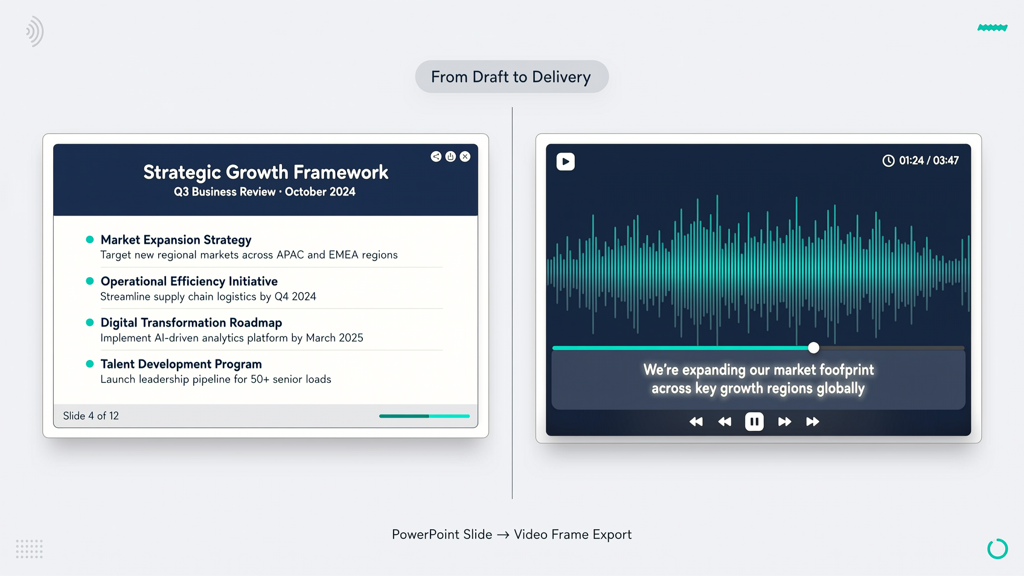
Your organization already owns the core assets: polished, approved, version-controlled PowerPoint decks—onboarding workflows, cybersecurity policies, HR handbooks, product updates. Rebuilding them as video from zero wastes time, budget, and institutional knowledge.
Turning those decks into effective e-learning videos is now a streamlined, repeatable process—not a custom production pipeline. The goal isn’t Hollywood-grade animation. It’s clarity, consistency, and speed.
Here’s how high-performing L&D teams approach it:
- Start with purpose-driven edits: Trim redundant slides. Group related concepts. Add visual cues (arrows, highlights, zoom-ins) where emphasis matters—like highlighting a checkbox in a compliance form or animating a step-by-step workflow.
- Write concise narration scripts: Convert slide headlines and key bullets into natural-sounding spoken language. Avoid jargon. Use active voice (“You’ll submit the form here” vs. “The form must be submitted”). Keep sentences under 18 words.
- Leverage existing brand assets: Preserve your company fonts, color palette, and logo placement. Consistency reinforces trust and recognition.
- Batch-process similar decks: Onboarding, security awareness, and benefits enrollment often share structure and tone. Create reusable templates—including intro/outro slides, subtitle styling, and voice profiles—to accelerate future conversions.
The result? A library of short, focused, searchable video modules—each under 5 minutes—that learners complete at their own pace, revisit before audits, and share with peers.
Human Voice or Text-to-Speech? Choose Based on Impact—and Scale
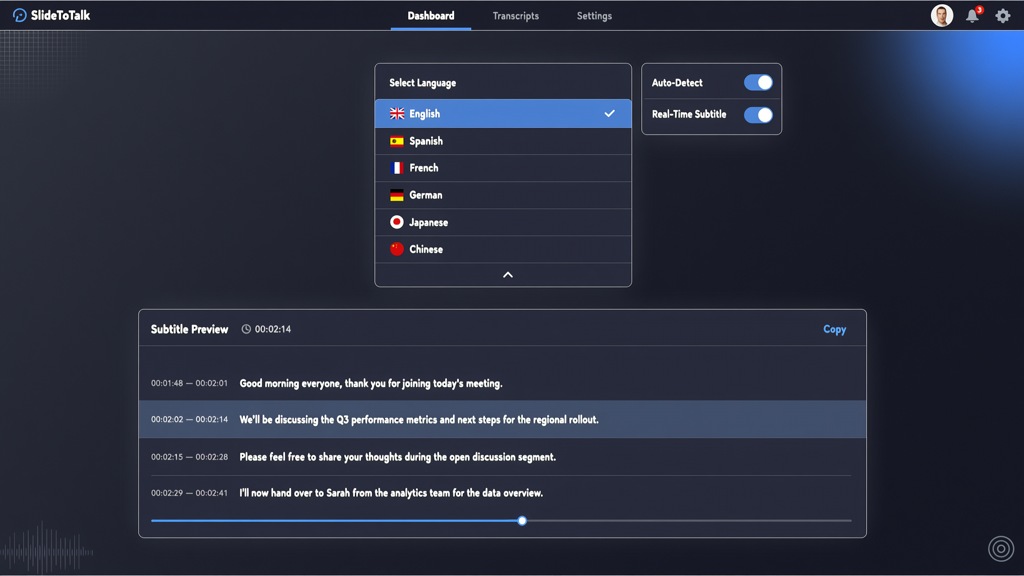
Narration is the heartbeat of any effective training video. But sourcing, scheduling, and editing human voice talent doesn’t scale—especially for frequent updates or multilingual needs. That’s why modern tools offer two pragmatic paths—both valid, both supported:
- Recorded voice (free & authentic): Subject-matter experts or internal L&D leads can record narration directly—no studio needed. A quiet room, decent headset, and a few takes yield warm, credible, human-led videos. This works exceptionally well for leadership messages, culture onboarding, or scenario-based roleplays.
- Text-to-speech (fast & consistent): For high-volume, frequently updated content—like policy refreshers or software release notes—TTS delivers professional, clear, and error-free narration in seconds. Modern TTS engines capture natural rhythm, pauses, and emphasis—no robotic monotone.
Crucially, both options integrate seamlessly with slide timing, transitions, and subtitle generation. You’re never locked into one path: use human voice for strategic messaging and TTS for operational updates—all within the same workflow.
Multilingual Narration + Subtitles: A Must-Have for Global Teams
For organizations with employees across regions, language shouldn’t be a barrier to understanding—or compliance. Yet translating static slides often means separate decks, inconsistent visuals, and delayed rollouts.
A better approach: produce one source deck, then generate narrated videos in six core languages—English, Chinese, Japanese, Spanish, French, and German—using the same timing, visuals, and branding. No re-layouts. No version drift.
How it works:
- Upload your original slide deck and English narration script.
- Translate the script professionally—or use trusted AI-assisted translation tools.
- Select target language and voice profile (e.g., “Spanish (Spain), professional female voice”).
- Generate synchronized video with auto-aligned subtitles—fully editable for accuracy and tone.
Subtitles aren’t an afterthought—they’re embedded accessibility infrastructure. They support:
- Deaf and hard-of-hearing learners
- Employees working in noisy or quiet environments (open offices, manufacturing floors, home offices)
- Non-native speakers reinforcing vocabulary and pronunciation
- Searchability: learners can search transcripts for keywords (“data breach,” “expense approval,” “return-to-office policy”)
And because subtitles are generated alongside narration—not added manually—they stay perfectly synced, even when edits are made.
SlideToTalk: The Focused Tool for Turning Slides Into Watched Videos
Not every learning technology needs to be an all-in-one platform. Sometimes, what you need is precision—not bloat.
SlideToTalk is built for one mission: help L&D professionals and instructional designers turn existing training decks into polished, narrated, accessible e-learning videos—quickly and reliably. It handles the video-creation step so you can focus on learning strategy, not technical overhead.
What SlideToTalk does well:
- Convert training deck to video in minutes—not days—with full control over timing, transitions, and visual emphasis.
- Support e-learning video from slides in standard formats (PPTX, PDF), preserving animations, charts, and speaker notes.
- Enable training video from powerpoint with either recorded voice or high-fidelity TTS—no external audio editing required.
- Offer native employee training video maker features: subtitle generation, multilingual voice selection (English, Chinese, Japanese, Spanish, French, German), and downloadable MP4/MP3 files.
- Export cleanly—ready for upload to any LMS, intranet, or learning portal. No proprietary player. No forced hosting. No SCORM wrappers.
What SlideToTalk does not do: It’s not an LMS. It doesn’t host courses, manage enrollments, or run analytics. It doesn’t add avatars, talking heads, or animated characters. It focuses exclusively on transforming your slide content into effective, watchable video—so you retain full control over distribution, tracking, and integration.
That focus enables reliability, speed, and predictability—especially when converting dozens of decks across departments or launching region-specific compliance campaigns.
Practical Tips for Getting Started Today
You don’t need a pilot program or executive buy-in to begin. Start small, measure impact, and scale deliberately:
- Pick one high-impact, low-complexity deck: Try your IT security awareness module or new-hire welcome sequence. These are universally required, frequently updated, and benefit immediately from narration and subtitles.
- Repurpose speaker notes as narration drafts: Most well-built decks already contain concise explanations in the notes pane—perfect starting points for voice scripts.
- Test two versions: Generate one video with TTS and one with a 2-minute recorded voiceover. Share both with a small group of learners and ask: Which felt clearer? Which would you replay if unsure?
- Embed subtitles by default: Make them visible and editable—not optional. This signals inclusion and improves SEO-like discoverability inside your LMS or intranet search.
- Track completion—not just clicks: Once uploaded to your LMS, monitor % watched, drop-off points, and replay rates. If learners exit at slide 7, revisit that concept’s clarity—not just the video length.
Summary: From Passive Slides to Active Learning
Employees don’t ignore training because they lack motivation—they disengage when content feels irrelevant, inaccessible, or overwhelming. Static slides, especially without context or voice, amplify that disconnect.
Converting training decks into narrated e-learning videos bridges that gap. It transforms passive reading into guided learning—adding pacing, emphasis, emotion, and clarity. With multilingual narration and built-in subtitles, it meets global and accessibility standards without extra effort. And with tools like SlideToTalk, it scales across departments, languages, and updates—without requiring video expertise or extended timelines.
You already have the content. You already have the subject-matter experts. What’s missing is the efficient, reliable bridge from deck to video—the step that makes training something employees watch, not just scroll past.
So ask yourself: Which three decks will you turn into watched videos this quarter?
Try SlideToTalk free
Upload your PPT, PDF, or images. Add narration with text-to-speech or your own voice, and export a narrated video in one click.
Start for free →